A model change shouldn'tbecome five redeploys.
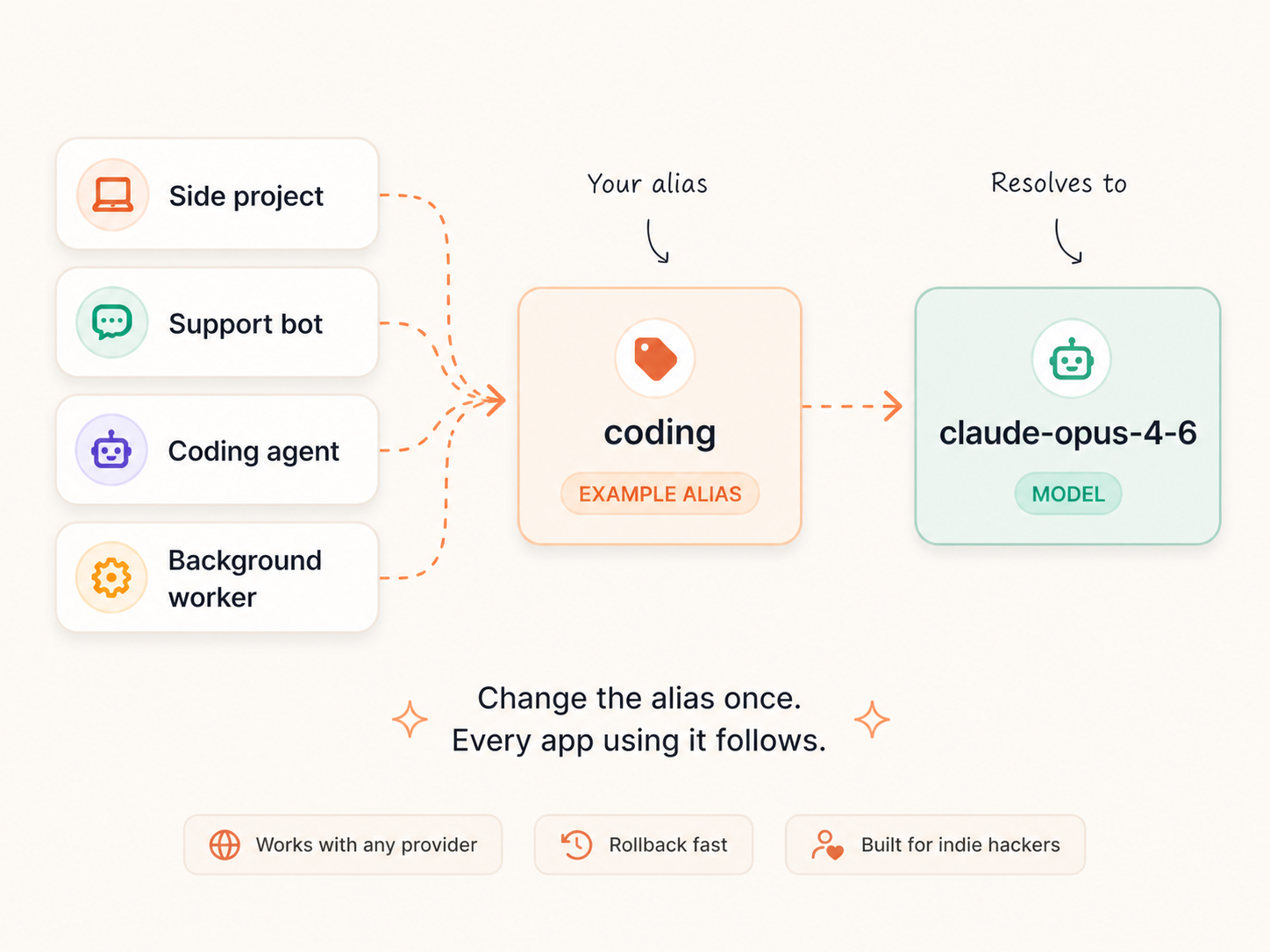
Make aliases like coding, support, openai, anthropic, google or anything that fits your setup. Point each one to a real model and change it anytime from one dashboard.
When a provider ships a better model, breaks something or deprecates the one you use, update the alias once. Every app using it follows.
For indie hackers with too many AI products and not enough patience.
THE PROBLEM
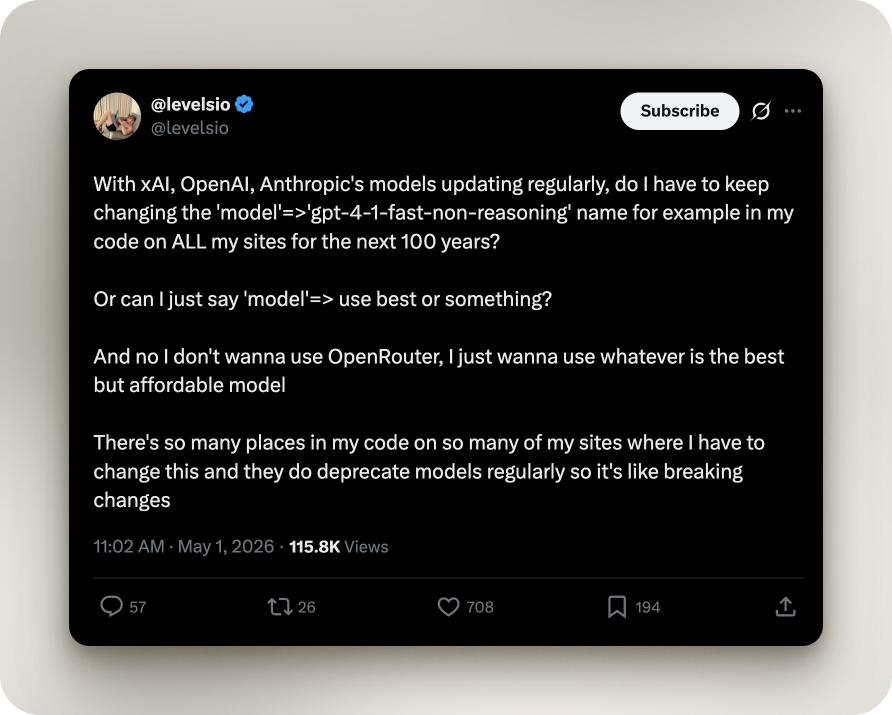
Model names change. Your code should not.
Providers rename, deprecate and release models constantly. ModelAlias gives your app one stable name in code, then lets you update the real model from a dashboard. No deploy required.
THE FIX
Create your own aliases instead of hardcoding model names.
Your app should not need to know the exact model name forever.
With ModelAlias, you create aliases that make sense for your products. They can be based on providers, use cases, cost, quality, environments or whatever naming system your brain will still understand in three months.
Examples:
codingsupportcheapfastopenaianthropicgoogleproductiontest-modeltiny-brainexpensive-but-worth-itThen you decide what real model each alias points to from the ModelAlias dashboard. When you change the model behind an alias, every app using that alias follows automatically.
No code changes. No redeploys. No SDK lock-in.
| Alias you create | Resolves to | Example use |
|---|---|---|
coding | claude-opus-4-6 | Coding agents and dev tools |
support | gpt-4.1-mini | Support bots and chat widgets |
cheap | gemini-2.5-flash | Background jobs and experiments |
openai | gpt-4.1 | Apps where you want your current OpenAI pick |
anthropic | claude-sonnet-4-5 | Apps where you want your current Anthropic pick |
google | gemini-2.5-pro | Apps where you want your current Google pick |
These are just examples. You create the aliases that fit your products.
Create aliases for how you actually build.
ModelAlias does not force a naming system on you. You can name aliases by provider, task, price, quality, environment, client, product or whatever helps you keep your AI apps organized.
Use-case aliases
codingsupportsummariesemail-writerchatbotGood for apps where you want the name to describe the job, not the provider.
Provider aliases
openaianthropicgooglexaiopenrouterGood for products where you want a stable provider-specific model choice.
Cost aliases
cheapbudgetbackgroundpremiumGood for keeping expensive models away from low-value tasks. A noble pursuit.
Quality aliases
fastsmartreasoningbestGood when different parts of your product need different levels of model power.
Environment aliases
dev-modelstaging-modelproduction-modelGood for testing model changes before your users get to experience your bold decisions.
Weird aliases
tiny-brainbig-braindo-not-touchoops-rollbackAlso valid. It is your dashboard. Live your truth.
How it works
Three steps. No SDK. No magic.
Create your own alias
Make an alias for a provider, use case, product, environment or whatever naming pattern you want. ModelAlias does not come with predefined aliases. You create your own.
coding→claude-opus-4-6Point it to a real model
Choose the actual model name the alias should resolve to. Your code calls the resolve endpoint and gets back a plain-text model name.
cheap→gpt-4.1-miniUpdate once
Change the real model from your dashboard whenever you want. Every product using that alias gets the update. No code changes. No redeploys.
support→gemini-2.5-flashPricing
One simple plan for stable model aliases.
- 5 aliases
- 1 API key
- Reasonable rate limits
- Plain-text resolve endpoint
- Dashboard access
FAQ
What is ModelAlias?
ModelAlias lets you create stable aliases for the AI models your products use. Your app calls an alias, and ModelAlias returns the real model name behind it.
Why would I use this?
Because AI model names change, models get deprecated and new models come out constantly.
Instead of updating every app, script, bot or worker manually, you update one alias and every app using it follows.
Does ModelAlias call the AI model for me?
No. ModelAlias only resolves aliases into model names.
Your app still calls OpenAI, Anthropic, Google, xAI, OpenRouter or whichever provider you use.
Can I create my own aliases?
Yes. You choose the alias names. They can be based on providers, use cases, products, environments, cost or whatever fits your setup.
Can I roll back a model change?
Yes. Point the alias back to the previous model from the dashboard. Every app using that alias gets the rollback without code changes or redeploys.
Does ModelAlias come with pre-built aliases?
No. You create your own aliases. ModelAlias gives you the dashboard and resolve endpoint. You decide the names, the real model values and how your products use them.
Is ModelAlias a router?
No. ModelAlias is intentionally simpler than a router. It does not proxy completions, manage prompts or sit between your app and the model response. It only resolves aliases into model names.